Agentic video editing
The agentic video editor with an AI creative director
Agentic video editing means an AI agent holds the plan: you set the goal, it decides which edits are needed, carries them out, looks at the result and revises it. In Engrama that agent is a creative director that leads a small team of specialists and edits through the same tools you use.
What is an agentic video editor?
A traditional AI feature is a button: remove silences, add captions, find highlights. You still decide what to press and in which order. An agentic video editor takes a goal, such as “turn this interview into a 45-second vertical short that opens on the strongest line”, and works out the steps itself. It also checks its own output and fixes problems before it says it is done.
Engrama is built around that idea, with one constraint: the agent may only change the project through the editor's real tools. It never paints a video you cannot edit. Every cut, caption, graphic and audio level it makes is a normal clip or setting on the timeline.
How a production runs in Engrama
Understand the brief and the media
The footage is transcribed with word timings and measured for pauses, scene changes and loudness. A reference video is sampled frame by frame and transcribed, so its pace, hook and sound bed can guide the edit.
Ask only what matters
If the material leaves an important choice open, for example vertical or horizontal when the clips are mixed, the director asks one short question with options and a recommendation. Otherwise it decides and lists its assumptions.
Write the treatment and assemble the team
The creative director sets the objective, length, format, pacing and look, then brings in only the specialists the project needs: a story editor, motion designer, asset researcher, sound designer, colourist and reviewer.
Build the edit with real tools
Moments are selected and ordered on word boundaries, pauses and retakes removed, captions and titles placed, graphics rendered as clips, licensed B-roll and music added, speech cleaned and music ducked. Each specialist can change only its own clips, so work does not collide.
Review the actual render
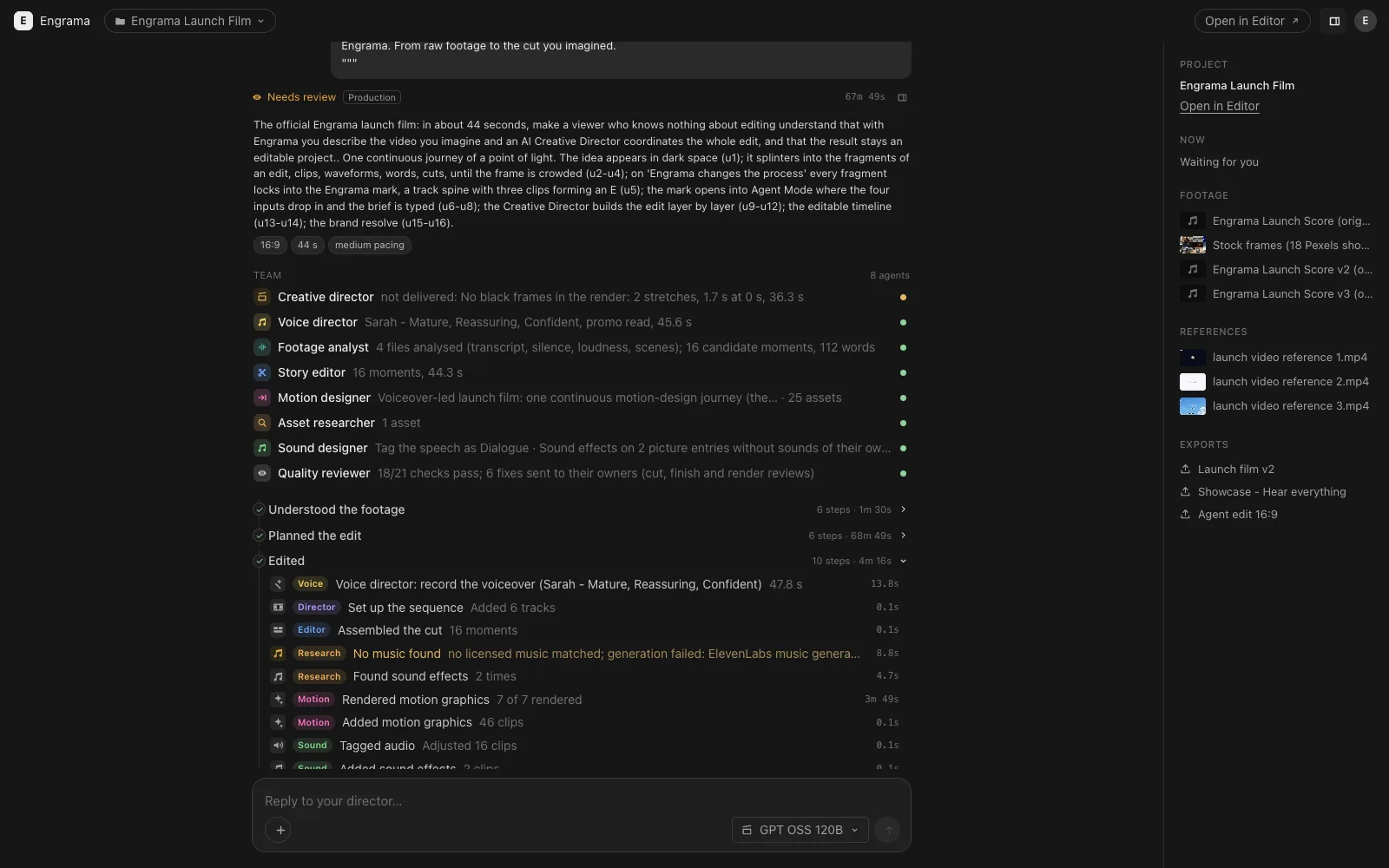
A draft is rendered and checked: black frames, freezes, dead air, loudness and peaks, caption overlap, contrast, safe areas and framing. Rendered frames can also be shown to a vision-capable model to catch a cut-off face or a B-roll shot that does not match what is said.
Fix, then deliver
Failures are fixed with targeted edits and checked again, a bounded number of times. The edit arrives on your timeline as one undoable change, marked Done or Needs review with the reasons.
Why the review step matters
An AI that edits without looking at the result produces confident mistakes: captions over a face, music louder than the voice, a black frame at a cut. Engrama's reviewer measures the rendered file rather than trusting the plan. Loudness is measured to the EBU R128 standard, contrast is measured against the pixels under each caption, and the mix is checked so speech stays clearly above the music. The result and any remaining problems are reported in plain words.
What the AI creative director decides, and what you decide
The director decides
- Which moments to keep and in what order
- Length, pacing and the opening line
- Caption style, emphasis and graphics
- Where B-roll, music and sound effects go
- Colour look and audio balance
You decide
- The goal, the audience and the brief
- Which footage and references to use
- Answers to its few questions, or “decide for me”
- Feedback such as “tighter” or “open on the budget line”
- Any frame-level change, by hand, on the timeline
Engrama also remembers standing instructions, such as brand colours or “never use stock music”, applies them to later edits in the project, and keeps a short profile of your preferences for your next projects.
Agent Mode: the director without the editor
Agent Mode, at engrama.io/agent, is a page for working with the creative director alone: attach footage and references, describe the result and follow the production as it runs. It is the same project and conversation as the Agent panel inside the editor. More on the AI video agent.
Example briefs
- “Turn these recordings into an engaging vertical short. Make it hard to stop watching.”
- “Create a documentary-style edit from these interviews about hard work, following the pacing of the reference.”
- “Make a 90-second product demo from my screen recordings with chapter cards and a voiceover.”
- “Remove the pauses, add word-by-word captions and put photos on screen for what he talks about.”
Give the director a brief
Bring raw footage and a goal; the agent plans, edits and checks the video, and you keep full control of the timeline.
Published by the Engrama team · Updated