Online video editor
A professional online video editor, in your browser
Engrama is a multitrack video editor that runs in Chrome, with the layout, panel names and keyboard shortcuts of Premiere Pro. Edit by hand with ripple, roll, slip and slide trims, keyframes, masks, colour and an audio mixer, or hand the edit to the AI creative director and refine what it builds.
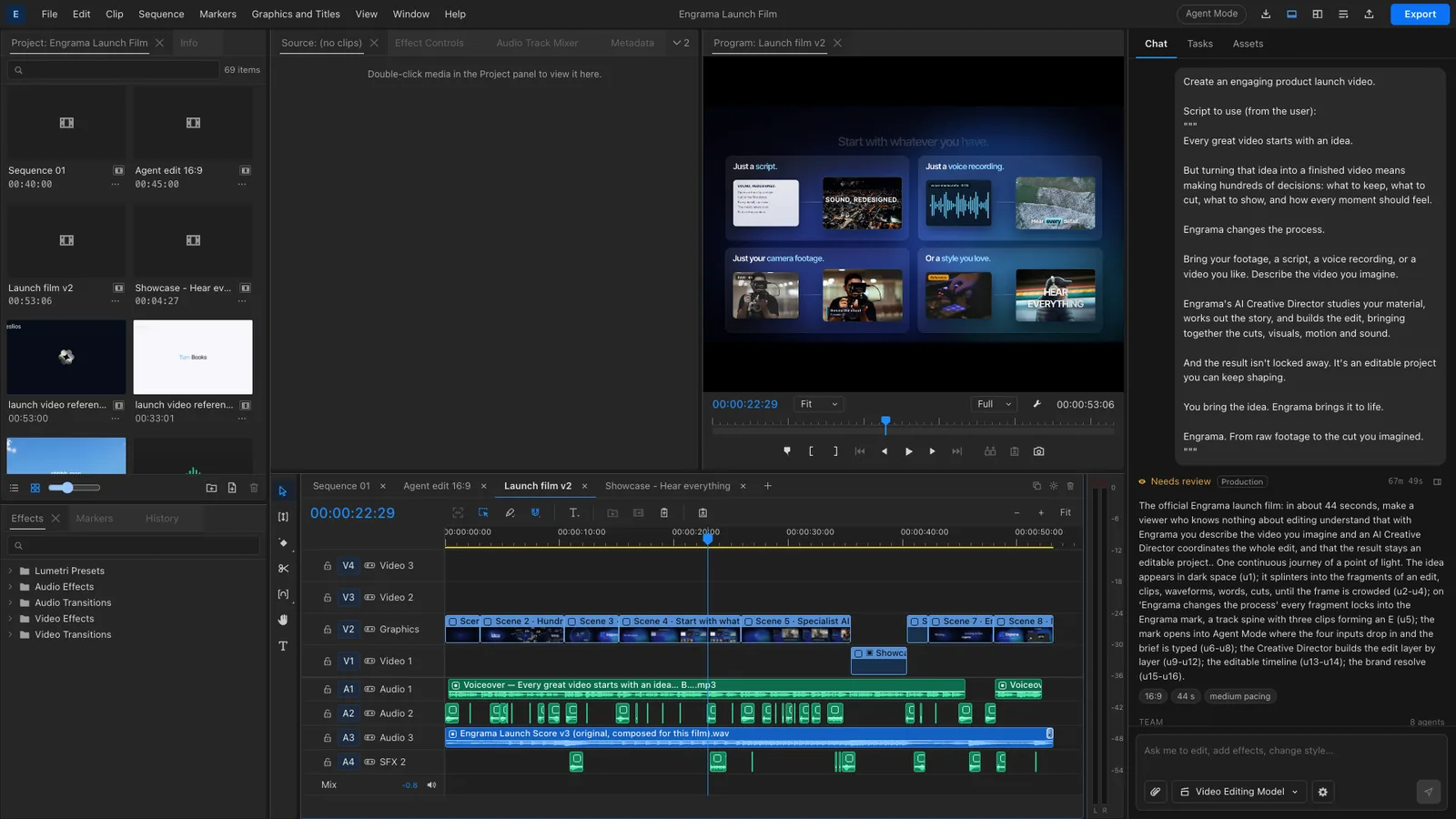
Edit on a real timeline
Cutting and trimming
Insert and overwrite from the Source monitor, three-point editing, razor and split, ripple delete, and ripple, roll, slip and slide tools with a two-up trim view.
Linked audio and video
Clips move, trim and split together; J-cuts and L-cuts by trimming one side; link and unlink; snapping to edits, markers and the playhead.
Motion, keyframes and masks
Position, scale, rotation, opacity, blur and volume keyframes with easing; crop, flips, ellipse, rectangle and pen masks with feather.
Colour, titles and transitions
Lumetri-style colour correction and looks, editable text clips with boxes and shadows, cross dissolves and dips to black or white.
Audio
An audio track mixer with pan, clip gain and normalising, fades and crossfades, noise reduction for speech and music that ducks under the voice.
Organising
Bins, subclips, markers, nested sequences, several sequences per project, speed and duration changes, autosave, checkpoints and full undo history.
Familiar if you edit in Premiere Pro
Panels are called what Premiere Pro editors expect (Project, Source, Program, Timeline, Effects, Effect Controls, Properties, Lumetri Color, Essential Sound, Audio Track Mixer) and the main shortcuts work the same way, so an editor can start without a manual. Engrama is independent and not affiliated with Adobe.
And an AI editor when you want one
The same editor has an AI creative director built in. Describe the video you want and it plans the edit, cuts the footage, adds captions, graphics, B-roll and sound, renders a draft and checks it, all as normal clips on this timeline. See the AI video editor and how agentic editing works.
What you need
- A desktop or laptop computer with a current version of Google Chrome (other browsers and phones are not tested yet)
- An Engrama account; projects are saved to your account as you edit
- Exports are MP4 files (H.264 video, AAC audio) of the whole sequence or a marked range
Open the editor
Create a project, add your footage and start cutting, or ask the agent for a first edit.
Published by the Engrama team · Updated