AI video editor
The AI video editor that edits the whole video for you
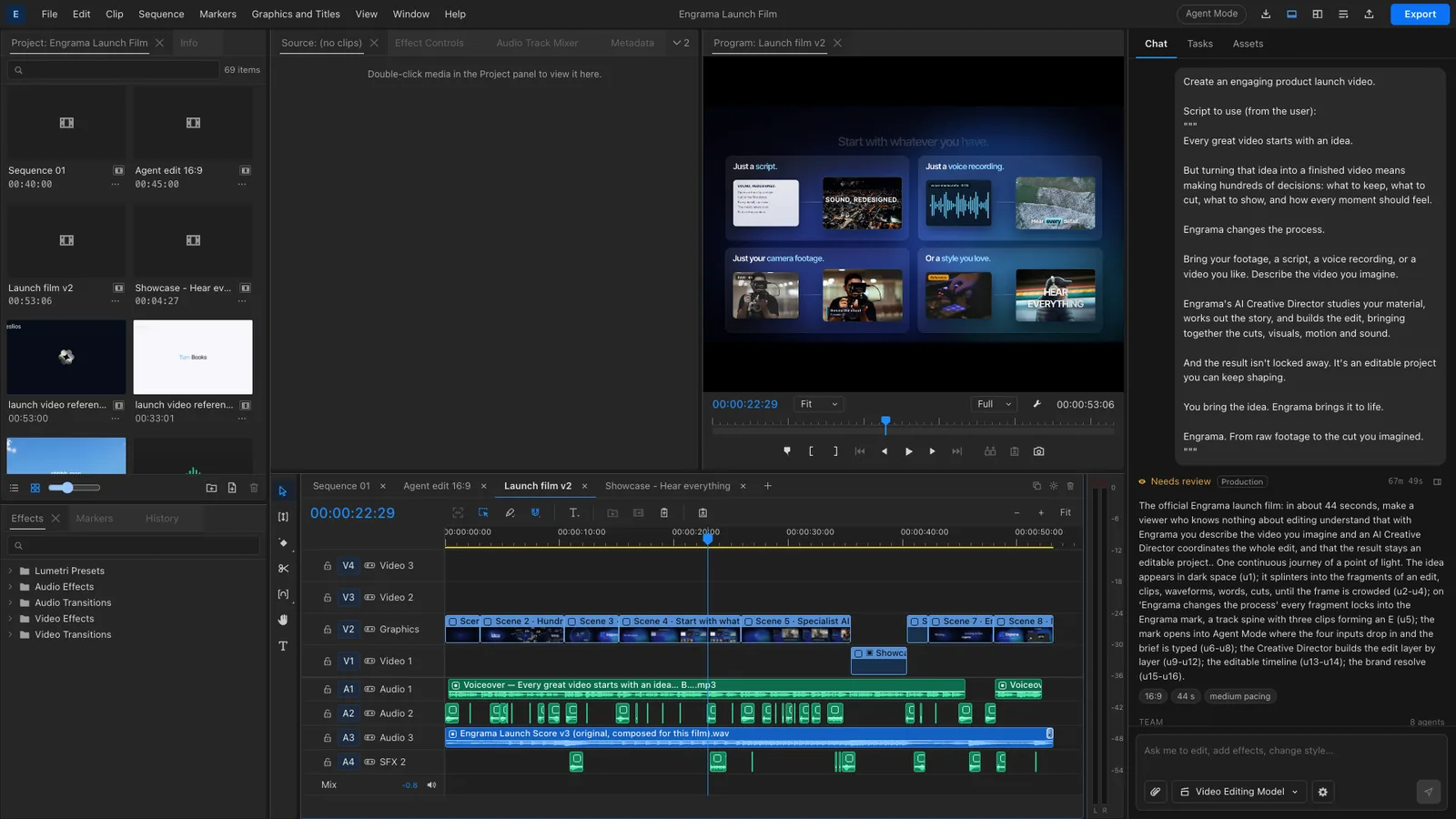
Engrama is the AI video editor with a creative director built in: upload raw footage, add a reference and describe what you want. The director analyses the material, cuts it, adds captions, B-roll, motion graphics, voice and sound, checks the render, and leaves every piece on a multitrack timeline you can keep editing.
What the AI video editor does with your footage
Most AI video tools do one job: find clips, add captions or generate a shot. Engrama is built to do the whole edit, the way an editor would, and then hand it back to you in a real editor.
Reads the material first
Speech is transcribed with word timings; pauses, scene changes and loudness are measured; a reference video is watched and listened to before anything is cut.
Cuts on the words
Pauses and repeated takes are removed between words, the strongest moments are chosen and ordered, and the edit is reframed to 9:16, 1:1 or 16:9.
Finishes the video
Word-by-word captions, titles, motion graphics, punch-in zooms, licensed B-roll timed to what is said, music that ducks under speech, sound effects and a colour look.
Checks the render
A draft is rendered and inspected for black frames, dead air, loudness and peaks, caption overlap, text contrast and framing, then fixed and checked again.
How to edit a video with AI in Engrama
Add your media
Upload video, audio, images or a screen recording. Add a reference video or image if you want a particular style, and a script if you have one.
Describe the result
Write a short brief, for example “a 30-second vertical reel with bold captions and upbeat music” or “a 90-second product demo with chapter cards”.
Let the agent produce it
You see each stage as it runs: understanding the footage, the plan, the edit, the review. The agent asks a question only when the answer would change the result.
Refine and export
Ask for changes in plain language or edit the timeline yourself, then export an MP4. Undo removes a whole agent turn in one step.
An editable timeline, not a black box
Everything the agent does is an ordinary edit: clips, cuts, keyframes, effects, captions and audio levels on a multitrack timeline. The editor follows the layout, panel names and keyboard shortcuts of Premiere Pro, with ripple, roll, slip and slide trims, three-point editing, keyframes, masks, Lumetri-style colour, an audio mixer and Essential Sound-style loudness and ducking. You can open any clip the agent placed and change it.
Engrama is independent and not affiliated with Adobe.
What you can make
Talking-head reels and shorts
One take becomes a captioned vertical reel with zooms, B-roll and music.
Talking-head editingProduct and launch videos
Screen recordings and app screens become a narrated demo or a motion-graphics promo.
Watch the Engrama launch filmClient work at volume
Short-form agencies can start every reel from a full first finish and polish it in a familiar editor.
Engrama for agencies
Why Engrama is different
The whole edit, not one button
Clip tools find highlights and caption apps add text. Engrama plans and builds the entire video from a brief: selection, cuts, captions, graphics, B-roll, music and mix.
It checks its own work
Every production is rendered and measured before it reaches you, and problems are fixed automatically, so you get a finished video rather than a first draft.
A real editor underneath
Nothing is baked. Every decision is a clip or a keyframe in a professional, Premiere-style editor, so you can change any detail by hand.
See the full list of capabilities on the features page.
What goes in and what comes out
You bring
- Camera and phone footage, screen recordings, photos and images
- Voice recordings, podcasts and music
- A script: pasted, or a text, Markdown, SRT, VTT or Fountain file
- A reference video, image or audio clip whose style you want
- A short brief in plain language
You get
- A finished, checked edit on a multitrack timeline
- Every cut, caption, graphic, voice line and sound as its own clip
- 9:16, 1:1, 4:5 or 16:9, framed on purpose
- MP4 export (H.264 and AAC) with no watermark
Edit by prompt, by reference or by hand
With a prompt
Say what the video should be, or what to change, in plain words.
Edit video with AI promptsFrom a reference
Attach a video you love and get your footage in that style.
Edit like a referenceIn a chat
Work with the director in Agent Mode and follow the production as it runs.
The AI video agentBy hand
Open the timeline and change any clip with Premiere-style tools.
The online editor
AI video editor questions
What is the best AI video editor?
The one that finishes the whole edit and still lets you change every detail. Engrama's creative director plans, edits and checks the video from a brief, and the result is an editable timeline in a Premiere-style editor. See how Engrama compares.
Is Engrama an AI video generator or an editor?
Both. Engrama edits your own footage and also generates what a video needs, such as shots, images, a voiceover and sound effects, then assembles everything into one edit. AI video generator.
Can I edit the AI's work by hand?
Yes. Every decision is a clip, a cut or a keyframe on the timeline, and every agent turn can be undone in one step.
Do I need to install anything?
No. Engrama runs in Google Chrome on a desktop or laptop.
Start with one raw take
Upload a recording, describe the video you want and see the editable cut the agent builds.
Published by the Engrama team · Updated